


1. Introduction to Modern Headless Website Development
Modern websites are no longer built only to display static pages and blog posts. Today’s businesses require highly interactive, fast-loading, scalable, and SEO-friendly digital experiences that work across multiple devices and platforms. Traditional monolithic architectures often struggle to meet these expectations because the frontend and backend are tightly connected, making customization and scalability more difficult. This is why headless architecture has become increasingly popular in modern web development.
A Headless WordPress and Next.js setup separates content management from frontend rendering. WordPress handles content creation and management, while Next.js handles the frontend user experience using React-based technologies. This approach allows developers to create highly optimized websites while content editors continue using the familiar WordPress dashboard. The result is a modern system that delivers better performance, stronger SEO capabilities, and a significantly better developer experience.
Modern headless architectures are especially useful for businesses that need:
- fast-loading frontend experiences,
- omnichannel content delivery,
- advanced UI interactions,
- advanced SEO strategies,
- and independent frontend/backend deployment workflows.
However, headless CMS architecture also introduces additional complexity in deployment, preview workflows, caching, and frontend maintenance. It is best suited for projects where flexibility and performance justify the extra engineering overhead.
2. Understanding the Headless CMS Architecture
A headless CMS architecture removes the traditional frontend layer from the CMS and exposes content through APIs such as REST API or GraphQL. Instead of WordPress rendering HTML pages directly through PHP themes, the frontend application independently fetches content and displays it to users.
This separation enables greater flexibility in choosing frontend technologies, allowing developers to leverage frameworks like Vue.js or Angular alongside Next.js. By utilizing APIs, content can be repurposed across various platforms, including mobile apps and IoT devices, enhancing content reach. Additionally, teams can implement a microservices architecture, where different services can be scaled independently based on demand. This setup not only streamlines updates and maintenance but can also reduce certain frontend-related attack surfaces commonly associated with traditional CMS, when implemented correctly. As a result, businesses can adapt more rapidly to changing market conditions while delivering a seamless user experience.

In this system, WordPress acts purely as a content management backend responsible for storing posts, pages, media, SEO data, and structured content fields. The frontend application built with Next.js communicates with WordPress through APIs and renders highly optimized pages using advanced rendering techniques such as Static Site Generation (SSG), Server-Side Rendering (SSR), and Incremental Static Regeneration (ISR).
This separation provides greater flexibility because both systems can evolve independently. Developers can modernize the frontend without affecting the content management workflows, while editors continue working within the familiar WordPress environment.
3. Why WordPress Is Still the Best CMS Choice
Even in modern headless architectures, WordPress is one of the most popular CMS solutions available because of its mature ecosystem, extensibility, and user-friendly administration panel. WordPress powers a large percentage of websites globally and has a massive plugin ecosystem that simplifies content management, SEO optimization, media handling, multilingual support, and custom content modeling.
Moreover, the active community surrounding WordPress contributes to ongoing improvements and security updates, ensuring that the platform stays relevant. This support network also helps developers find resources, tutorials, and forums to troubleshoot issues or share insights. Integrating WordPress with frontend frameworks also enables faster development workflows and greater UI flexibility. The combination of WordPress’s content management capabilities and modern frontend tooling makes it suitable for a wide range of web projects.
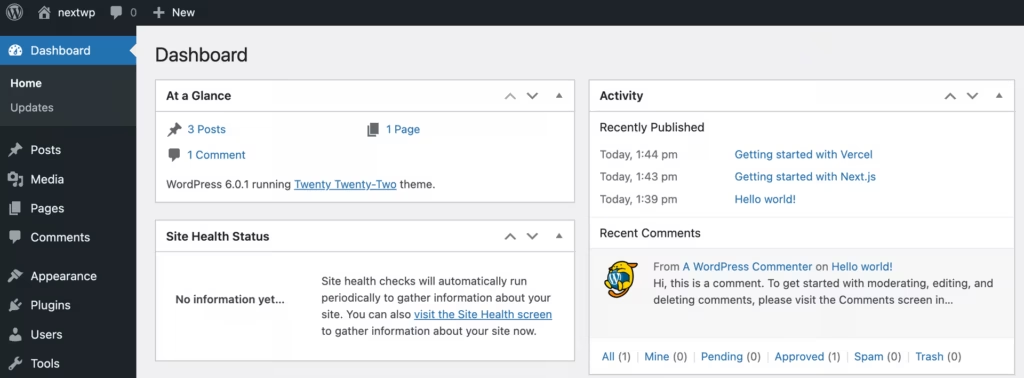
As a headless CMS, WordPress becomes even more powerful because developers are no longer limited by PHP themes or traditional WordPress templating systems. Instead, WordPress serves structured content through APIs while the frontend is fully customized using modern JavaScript frameworks.
Another major advantage is that non-technical content editors can continue using Gutenberg, media libraries, revisions, user roles, and publishing workflows without needing to learn new systems. This balance between editorial usability and frontend flexibility makes WordPress an ideal backend for enterprise-grade headless applications.
4. Why Next.js Is the Ideal Frontend Framework
Next.js has become one of the most widely adopted frontend frameworks for headless CMS projects because it solves many challenges associated with traditional React applications. Modern versions of Next.js also introduce the App Router architecture, which supports React Server Components, nested layouts, streaming UI, and improved server-side rendering workflows. Modern Next.js applications increasingly use React Server Components to reduce client-side JavaScript and improve rendering performance.
For new projects, many developers now prefer the App Router because it simplifies large-scale application architecture and improves performance optimization. Unlike standard React applications that rely heavily on client-side rendering, Next.js supports server-side rendering and static generation directly within the framework.
This is especially important for SEO and frontend performance. Search engines can properly crawl pre-rendered HTML pages, resulting in improved indexing and better rankings. Next.js also includes advanced optimization features such as automatic code splitting, image optimization, dynamic routing, middleware support, and edge rendering capabilities.
Another major advantage is the flexibility Next.js provides for rendering strategies. Developers can statically generate pages during build time, dynamically render pages per request, or incrementally regenerate pages when content changes. This allows the system to balance performance with real-time content updates efficiently.
5. Planning the Requirements Before Development
Building a modern headless website requires proper planning before development begins. One of the biggest mistakes teams make is focusing only on technology choices without properly defining project requirements, content structures, SEO goals, and scalability expectations.
Identifying the target audience and their needs is crucial in shaping the website’s functionality and design. Establishing a clear timeline and budget will help keep the project on track and within financial constraints. Additionally, integrating analytics tools from the outset can provide valuable insights into user behavior, guiding future enhancements. Regular communication among team members and stakeholders ensures that everyone remains aligned with the project’s goals and objectives. A well-planned approach lays the foundation for a successful and adaptable headless website.

A successful headless project typically starts by identifying the business objectives, user experience requirements, content workflows, expected traffic, SEO requirements, and third-party integrations. For example, an enterprise website may require multilingual content management, advanced role permissions, reusable content blocks, and scalable deployment infrastructure. An eCommerce platform may additionally require authentication systems, payment gateways, inventory synchronization, and personalized user experiences.
Proper requirement planning also helps determine the correct rendering strategy, API structure, frontend architecture, deployment workflow, and caching strategy. Without clear planning, even technically advanced systems can become difficult to maintain and scale over time.
6. Real-World Implementation Using Headless WordPress and Next.js
To better understand how modern headless architecture works in real-world production environments, we developed and deployed a production website, www.regur.net, using a Headless WordPress and Next.js architecture. The goal of the project was to create a high-performance, SEO-friendly, and maintainable frontend system while keeping WordPress as the content management backend.
The project requirements included:
- Fast page loading and strong Core Web Vitals performance
- SEO-friendly server-rendered pages
- Dynamic content management from WordPress
- Reusable frontend components
- Structured content architecture
- Flexible content modeling using custom post types
- Efficient API-based frontend communication
- Optimized image handling and caching
- Incremental Static Regeneration (ISR) for content freshness
- Strong developer experience with TypeScript and GraphQL
To achieve these goals, the system was built using the following technologies and tools:
Backend Technologies (WordPress)
WordPress CMSWPGraphQLWPGraphQL for ACFAdvanced Custom Fields (ACF)
The WordPress backend was configured as a dedicated content API system rather than a traditional PHP-rendered website. Multiple custom post types and structured ACF field groups were created to support dynamic UI rendering.
Frontend Technologies (Next.js)
The frontend architecture was built using React-based technologies and tooling to ensure scalability, performance, maintainability, and efficient API integration.
Next.jsReactTypeScriptTailwind CSSGraphQLgraphql-requestgraphql-tagGraphQL Code GeneratorISR (Incremental Static Regeneration)
Using ISR for Performance Optimization
One of the most important optimizations implemented in the project was Incremental Static Regeneration (ISR). Instead of rebuilding the entire website whenever content changed, pages were regenerated automatically in the background.
This allowed the website to:
- Serve extremely fast static pages
- Keep content updated automatically
- Reduce server load
- Improve scalability for large traffic volumes
In production environments, cache invalidation and content revalidation become critical parts of headless architecture. Many systems use webhook-triggered revalidation from WordPress to Next.js, combined with CDN caching and on-demand ISR, to ensure content updates appear quickly without rebuilding the entire application. Proper cache management is essential for maintaining both performance and content freshness at scale.
SEO Integration with Rank Math and WPGraphQL
SEO metadata was managed directly inside WordPress using Rank Math SEO and exposed through WPGraphQL Rank Math. The Next.js frontend fetched this SEO data dynamically and rendered:
- Meta titles
- Meta descriptions
- Open Graph tags
- Canonical URLs
- Structured metadata
This approach allowed content editors to manage SEO entirely from the WordPress dashboard while maintaining the performance benefits of a modern Next.js frontend.
7. Using GraphQL Instead of Traditional REST APIs
Although WordPress includes a built-in REST API, modern headless applications increasingly prefer GraphQL because it provides more efficient data handling. REST APIs often require multiple requests to fetch related data, which can create performance bottlenecks in large applications.
GraphQL allows developers to request precisely the data they need in a single query, reducing the amount of data transferred and improving load times. This capability is particularly beneficial for complex applications where multiple data types must be displayed simultaneously. By leveraging GraphQL, developers can create responsive and dynamic user experiences that adapt based on user interactions. Additionally, the strong typing system in GraphQL enhances code reliability and facilitates easier collaboration among development teams.
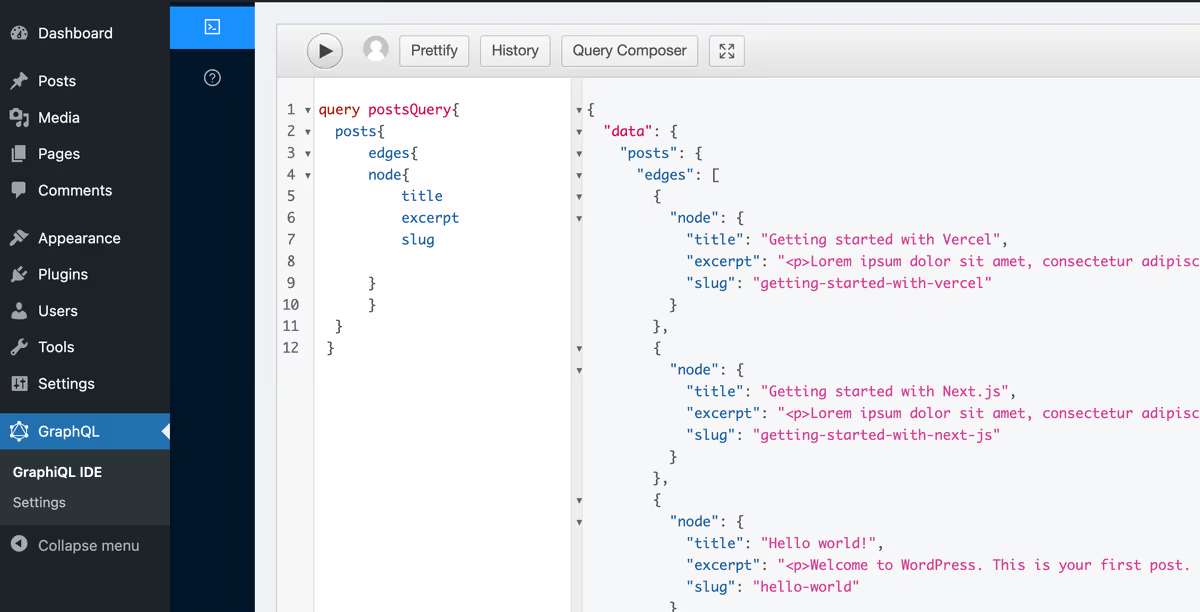
WPGraphQL transforms WordPress into a GraphQL-powered API server where developers can request only the exact data required for a page or component. This reduces unnecessary payload sizes and improves frontend performance significantly.
GraphQL also creates a more predictable development workflow because the schema is strongly typed and easier to manage in component-driven frontend systems. For large-scale websites with dynamic content structures, GraphQL generally provides a cleaner and more scalable solution compared to traditional REST endpoints.
8. Choosing the Correct Rendering Strategy
One of the strongest advantages of Next.js is its support for multiple rendering methods. Choosing the correct rendering strategy is essential because different types of pages have different performance and freshness requirements.
Static Site Generation is commonly used for blogs, landing pages, documentation, and marketing content because pages are pre-rendered during build time and delivered extremely quickly through CDNs. Server-Side Rendering is better suited for dynamic pages requiring real-time data, authenticated experiences, or personalized content because pages are rendered on demand.
Incremental Static Regeneration provides a hybrid solution where static pages automatically update in the background without requiring full site rebuilds.
However, SEO improvements are not automatic. Proper metadata handling, structured data implementation, XML sitemap generation, image optimization, and caching strategies are still required to achieve strong search engine performance.

This flexibility allows developers to optimize every page individually based on business requirements, performance goals, and content update frequency.
Additionally, the choice of rendering method can significantly impact SEO and user experience. For instance, Server-Side Rendering improves search engine crawlability by ensuring that pages are rendered before reaching the browser. Meanwhile, Static Site Generation can improve load times, leading to reduced bounce rates and better user engagement. Developers also have the option to combine these methods, leveraging the strengths of each for various sections of a site. This strategic approach enables a more tailored user experience while maintaining high performance across all content types.
9. Implementing SEO in a Headless Website
SEO is often one of the biggest concerns when businesses move to JavaScript-based frontend frameworks. Traditional React applications can struggle with SEO if pages are rendered entirely on the client side. However, Next.js significantly improves SEO capabilities through server-rendered and pre-rendered content.
Modern headless SEO implementations include dynamic metadata generation, Open Graph tags, canonical URLs, structured data, XML sitemaps, robots.txt generation, and clean URL structures. SEO plugins such as Rank Math or Yoast SEO can still manage metadata within WordPress, while Next.js fetches and renders this data correctly on the frontend.
Because pages are rendered before reaching the browser, search engines can properly crawl and index the content, resulting in improved search rankings and better organic traffic performance.
10. Optimizing Website Performance and Core Web Vitals
Performance optimization is one of the primary reasons businesses adopt a headless architecture. Keep in mind, while headless architectures can significantly improve frontend performance, the final results still depend heavily on implementation quality, caching configuration, frontend bundle optimization, and rendering strategy selection. Image optimization can become more complex in headless systems because developers must manage responsive image generation, remote WordPress media assets, CDN transformations, and Next.js image optimization workflows. Modern users expect fast-loading and responsive websites, and search engines increasingly prioritize performance metrics in rankings.
Next.js provides several built-in optimizations including automatic code splitting, image optimization, lazy loading, prefetching, and efficient JavaScript bundling. The next/image component automatically serves optimized and responsive images, helping improve Core Web Vitals such as Largest Contentful Paint (LCP) and Cumulative Layout Shift (CLS).
Headless architectures can improve performance significantly when combined with effective caching, optimized rendering strategies, and CDN delivery.

Deploying the frontend on platforms such as Vercel or Cloudflare Pages further improves performance because assets are distributed globally through edge CDNs. Combined with static generation and smart caching strategies, this architecture can achieve extremely fast page loading speeds even under heavy traffic conditions.
The framework also allows developers to create dynamic routes, making it easier to build complex applications while maintaining performance. With its robust ecosystem and community support, Next.js continues to evolve, introducing new features that enhance both developer experience and end-user satisfaction. These advantages have positioned Next.js as a leading choice for modern web development.
11. Creating Reusable Content and Design Systems
Modern frontend systems are increasingly built using reusable design systems and component libraries. Instead of designing every page independently, developers create reusable UI components that dynamically display structured content coming from WordPress.
This approach improves development speed, visual consistency, scalability, and long-term maintainability. Tools such as Tailwind CSS, Storybook, and modern React component architectures help establish reusable systems for buttons, typography, layouts, cards, forms, and interactive UI elements.
When paired with structured WordPress content models, reusable components allow editors to build pages dynamically without requiring developers to manually code every layout variation. This creates a highly scalable content management workflow suitable for enterprise-level projects.
12. Integrating Third-Party Services and APIs
Modern websites rarely operate as isolated systems. Businesses often require integrations with analytics platforms, CRMs, marketing tools, authentication providers, payment gateways, search systems, and customer engagement tools.
A headless architecture makes these integrations significantly easier because the frontend is no longer limited by WordPress’s PHP rendering environment. JavaScript SDKs and APIs can be integrated directly within the Next.js application.
Common integrations include Google Analytics, PostHog, CRM systems, authentication providers, search platforms, payment gateways, customer engagement tools, and marketing automation platforms. Developers can also build custom API routes within Next.js to securely handle backend logic, authentication flows, form submissions, and external API communication.
This flexibility allows businesses to create richer and more personalized user experiences.
13. Deployment, Hosting, and DevOps Workflow
Modern headless websites usually use separate hosting environments for the frontend and backend systems. WordPress is typically hosted on managed WordPress hosting providers such as Kinsta, WP Engine, or Cloudways, while the Next.js frontend is deployed on platforms like Vercel, Netlify, or Cloudflare Pages.
This separation allows both systems to scale independently and improves deployment flexibility. Frontend deployments are commonly connected to GitHub repositories using automated CI/CD pipelines. Every code push can automatically trigger testing, builds, and deployments. Platforms such as Vercel are particularly popular for Next.js deployments because they provide built-in support for edge rendering, Incremental Static Regeneration (ISR), automatic preview deployments, and global CDN delivery.
While platforms such as Vercel and Netlify simplify frontend deployments, enterprise organizations may also use containerized deployments with Docker, Kubernetes, or cloud infrastructure providers for greater operational control, scalability, and infrastructure customization.
Environment variables are used to securely manage API keys, authentication credentials, and backend endpoints. Modern DevOps workflows also include performance monitoring, error tracking, and security auditing to ensure long-term system reliability and scalability.
14. Challenges and Considerations of Headless Architecture
There are several important considerations to keep in mind regarding headless architecture. Although headless WordPress offers major advantages in flexibility, scalability, and frontend performance, it also introduces additional operational complexity compared to traditional WordPress websites.
Common challenges include:
- previewing unpublished content
- draft mode configuration and authenticated preview workflows
- cache invalidation
- search implementation
- image optimization
- authentication handling
- plugin compatibility limitations
- and maintaining separate frontend/backend deployments.
Headless architecture also requires stronger frontend engineering expertise because developers are responsible for managing rendering strategies, API communication, deployment workflows, and frontend performance optimization.
For smaller business websites or simple marketing websites, traditional WordPress may still provide a more practical and cost-effective solution.
Headless architecture is generally most beneficial for:
- enterprise platforms,
- large-scale content websites,
- high-performance web applications,
- and organizations requiring advanced frontend customization.
15. Final Thoughts on Building Modern Websites with Headless WordPress and Next.js
Building a modern website with Headless WordPress and Next.js combines the strengths of both technologies into a future-ready and maintainable architecture. WordPress provides a mature and editor-friendly content management system, while Next.js delivers a modern frontend experience optimized for performance, SEO, flexibility, and developer productivity.
This architecture is especially valuable for businesses that require fast-loading websites, flexible frontend experiences and structured content management workflows. By separating content from presentation, teams can work more efficiently while creating digital experiences that are easier to maintain and evolve.
However, choosing between traditional WordPress and a headless architecture should depend on project complexity, development resources, long-term maintenance requirements, and scalability goals.
As modern web development continues moving toward API-first and composable architectures, the combination of WordPress and Next.js has become one of the most practical and powerful solutions for building high-performance websites, enterprise platforms, eCommerce applications, and content-driven digital experiences.
Frequently Asked Questions (FAQs)
1. What is a Headless CMS?
A Headless CMS is a content management system where the backend content management layer is separated from the frontend presentation layer. Instead of rendering webpages directly, the CMS exposes content through APIs such as REST API or GraphQL, allowing developers to build custom frontends using frameworks like Next.js or React.
2. Why use WordPress as a Headless CMS?
WordPress is widely used because it provides an easy-to-manage admin dashboard, strong content management capabilities, a large plugin ecosystem, and flexible content modeling. In a headless setup, WordPress handles content management while the frontend is built independently using modern technologies.
3. Why is Next.js commonly used with Headless WordPress?
Next.js is ideal for headless websites because it supports Static Site Generation (SSG), Server-Side Rendering (SSR), Incremental Static Regeneration (ISR), image optimization, dynamic routing, and strong SEO support. These features help build fast, scalable, and SEO-friendly websites.
4. What is the difference between traditional WordPress and Headless WordPress?
Traditional WordPress uses PHP themes to manage both frontend and backend together, while Headless WordPress separates the frontend completely. In a headless setup, WordPress acts only as a backend CMS and APIs provide content to a custom frontend application like Next.js.
5. Which API is better for Headless WordPress: REST API or GraphQL?
Both REST API and GraphQL can work with Headless WordPress, but GraphQL is often preferred for modern frontend applications because it allows developers to request only the required data in a single query. WPGraphQL is a popular plugin used to enable GraphQL support in WordPress.
6. What tools are commonly used in a Headless WordPress and Next.js project?
Common tools include WordPress, WPGraphQL, Advanced Custom Fields (ACF), Next.js, React, TypeScript, Tailwind CSS, Apollo Client, Vercel, GitHub Actions, and Cloudflare. These tools help create scalable, modern, and high-performance web applications.
7. Is Headless WordPress good for SEO?
Yes. When combined with Next.js, Headless WordPress can provide excellent SEO performance. Next.js supports server-rendered and pre-rendered pages, which help search engines properly crawl and index website content.
8. What are the benefits of using Next.js for frontend development?
Next.js provides several benefits including fast performance, automatic code splitting, image optimization, flexible rendering methods, strong SEO support, and improved developer experience. It also integrates well with deployment platforms like Vercel.
9. Can Headless WordPress websites scale easily?
Yes. Since the frontend and backend are separated, both systems can scale independently. CDN caching, static generation, edge delivery, and cloud hosting platforms help headless websites handle large traffic efficiently.
10. What is Incremental Static Regeneration (ISR) in Next.js?
ISR is a Next.js feature that allows static pages to update automatically in the background without rebuilding the entire website. It combines the speed of static websites with the flexibility of dynamic content updates.
11. Is Headless WordPress more secure than traditional WordPress?
In many cases, yes. Since the frontend is separated from WordPress, the public website does not directly expose the traditional WordPress theme layer. This can reduce certain attack surfaces, although proper API security and backend protection are still essential.
12. Can WooCommerce work with Headless WordPress and Next.js?
Yes. WooCommerce can be used in a headless architecture where WordPress manages products and orders while Next.js creates a fully customized storefront experience using APIs.
13. Is Headless WordPress suitable for enterprise websites?
Yes. Headless WordPress is highly suitable for enterprise websites because it supports scalable architectures, structured content systems, advanced integrations, multilingual setups, reusable frontend components, and high-performance delivery systems.
14. When should businesses avoid using Headless WordPress?
Headless WordPress may not be ideal for low-budget projects or teams without frontend development expertise. Since headless systems require separate frontend and backend management, they introduce additional complexity in deployment, caching, maintenance, and development workflows. Therefore, working with developers who have strong experience in headless architecture, API-driven systems, and modern frontend frameworks is highly recommended to ensure long-term scalability, maintainability, and performance optimization.


